Steam-specific notes
TL;DR — Epic Seven on Steam needs a STOVE account link; convert email/SNS to Steam login to keep progress rather than starting empty. The Steam store lists kernel-level anti-cheat UNCHEATER — expect elevation prompts; locked-down PCs may block launch. Wrong-bind recovery lives on the transfer guide (withdraw new link, then convert original). Unofficial Steam notes — not Smilegate/STOVE/Steam.

Player-facing Steam notes for Epic Seven app 5019180: account linking, anti-cheat expectations, and common launch failures. Paraphrases public store/FAQ text — verify live Steam and STOVE screens. Independent guide.
Account & platform
- Steam clients still authenticate a STOVE account behind the scenes.
- Convert email/SNS → Steam Simple Login before treating Steam as primary if you keep progress.
- Cross-play with STOVE PC/mobile is described in the official Steam FAQ after a correct link.
- Foundry characters are separate from legacy progress even on the same STOVE login.
Account bind & wrong link
Steam play still goes through a STOVE identity. Converting your existing email/SNS login to Steam Simple Login keeps legacy progress; launching first often creates an empty Steam-linked STOVE account that blocks the conversion until withdrawn.
Symptoms
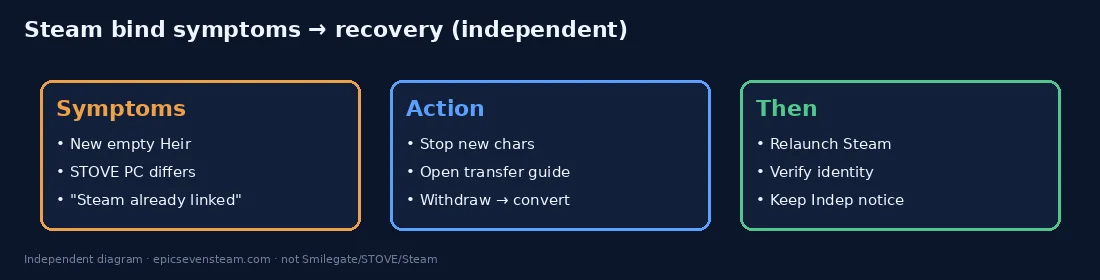
- Steam opens a brand-new Heir with none of your heroes or purchases.
- STOVE PC/mobile still show the old account while Steam does not.
- Conversion UI says a Steam link is already in use.
Recovery
Use the withdraw-then-convert outline: authorize the empty Steam link on STOVE, withdraw that STOVE account, then convert the original login. Full steps and screenshots targets live on the Transfer guide.
UNCHEATER / anti-cheat
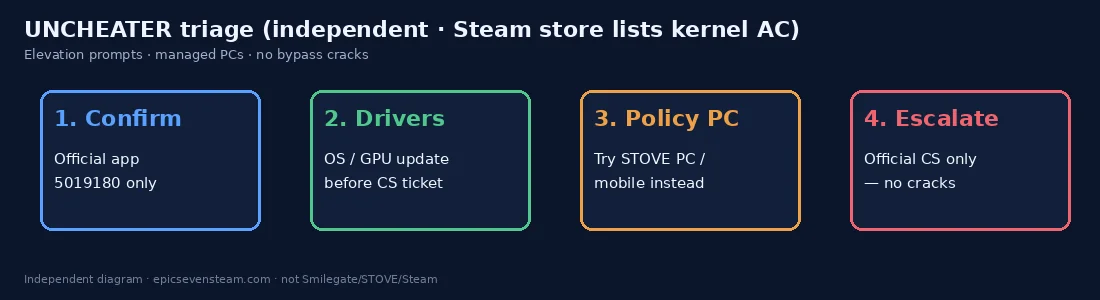
- Steam store lists kernel-level anti-cheat UNCHEATER for Epic Seven.
- Expect administrator/elevation prompts on first launch; corporate or school images may block the driver.
- Do not download “UNCHEATER bypass” cracks — that is malware territory and against the game ToS.
- If launch fails on a locked-down PC, try STOVE PC/mobile with the same converted account, or use a personal machine.
- Update OS and GPU drivers before filing CS tickets about anti-cheat errors.
Client launch failures
Crash on start
Verify game files in Steam, update GPU drivers, temporarily check antivirus quarantines for UNCHEATER components, and reboot after failed driver installs. Still stuck → official CS only.
Login loop / wrong Heir
You are likely on the empty Steam-linked STOVE identity. Stop creating characters; follow wrong-bind recovery on the transfer guide. Never use in-game delete after transfer to “clear” the empty slot.
Region / language oddities
Language packs and region UI follow Steam/STOVE settings. Re-check in-client language menus and STOVE account region before assuming a ban. Store sysreq text remains authoritative for hardware.
Languages (Steam listing)
Interface includes EN/KR/JP/ZH(trad/simp)/DE/FR/ES/PT/TH (per launch notice). Voice at launch: Korean / English; Japanese VO delayed with later resume planned.
System requirements (Steam minimum)
| OS | Windows 10 64-bit+ |
|---|---|
| CPU | Intel i5 or higher (min) |
| RAM | 8 GB (min) / 16 GB (rec) |
| GPU | GTX 1060+ (min) / GTX 1660+ (rec) |
| Storage | ~10 GB |
Support boundaries
Verify files, update drivers, and use official CS for UNCHEATER blocks. Wrong-bind recovery is on the transfer guide — not third-party binders.
Steam notes FAQ
Why did Steam create a new account?
Launching without converting email/SNS → Steam Simple Login often creates a new Steam-linked STOVE login. Withdraw it, then convert the original — see the transfer guide.
What is UNCHEATER?
The Steam store lists kernel-level anti-cheat UNCHEATER. Expect elevation prompts; managed PCs may refuse the driver. There is no safe “crack”; use official CS if blocked.
Game will not start after install
Verify files, update OS/GPU drivers, check antivirus quarantines, and confirm you are on app 5019180. Escalate only via official STOVE CS.
Is account-bind a separate tool?
This site folds bind/wrong-link recovery into the transfer guide and these Steam notes. There is no unofficial third-party binder — use STOVE’s own conversion UI.
Get the game
Official Steam store — Epic Seven