STOVE ↔ Steam account transfer
TL;DR — To keep progress, convert your existing STOVE email/SNS login to Steam Simple Login on STOVE before treating a fresh Steam session as your main account. If Steam already created an empty linked account, withdraw that new STOVE link first, then convert the original — cite the official Steam FAQ. Transfer does not move you onto Foundry; Foundry is a separate server. This site is an unofficial player guide.
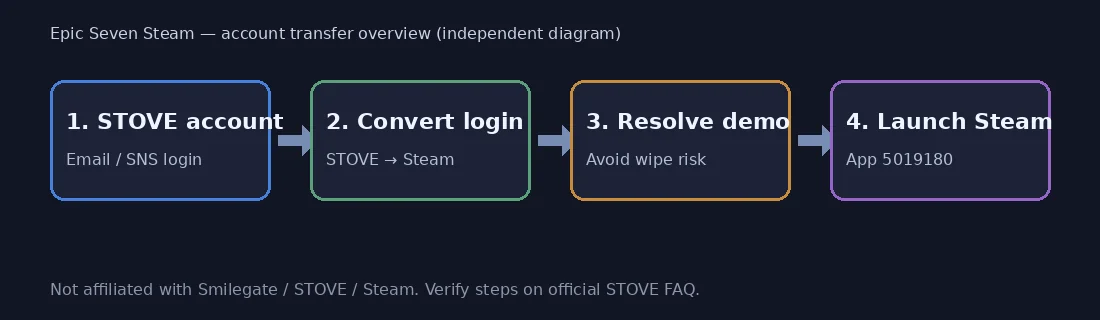
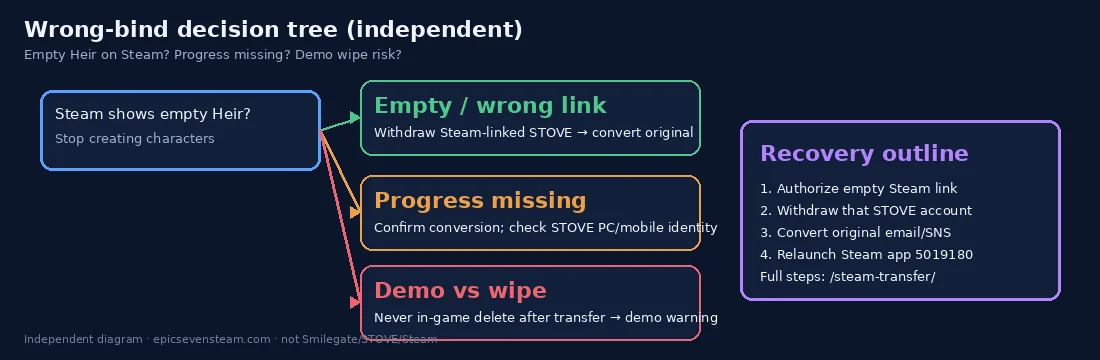

Goal: keep existing progress by converting to Simple Login (Steam) on STOVE before relying on a fresh Steam session. Paraphrases public STOVE FAQ — follow live UI.
Before you convert
- Screenshot currency, heroes, and Epic Pass status so you can prove ownership to CS if needed.
- Confirm which email or SNS login owns the progress you want to keep — do not guess.
- Do not rush a brand-new Steam login first if you care about the old account.
- Read the official STOVE Steam FAQ and demo deletion precaution before linking.
- If a demo/empty Steam-linked account already exists, plan the withdraw-then-convert path first.
Recommended path (keep progress)
- Do not rush into Steam first if you care about the old account. Launching without conversion often creates a new Steam-linked STOVE account.
- Open official STOVE account tools on PC and convert email or SNS → Simple Login (Steam). Transfers are described as available anytime.
- Complete Steam authorization when prompted, then confirm the linked login on STOVE.
- Install / play via Steam from the official store. Per FAQ, STOVE PC and mobile still work afterward. Download / store entry. After conversion, do not use in-game account deletion on a demo/client session — see demo delete warning.
- What carries over: progress, heroes, items, purchases, unclaimed rewards, event items, Epic Pass — as stated officially. Re-check if policies change.
If Steam already created a new account
Official recovery outline (paraphrased): withdraw the new Steam-linked STOVE account first, then convert your original.
- On STOVE login, choose Steam account type.
- Authorize the Steam account used for Epic Seven.
- Finish STOVE registration / verification if asked.
- Withdraw that Steam-linked STOVE account per STOVE UI.
- Then convert your original email/SNS account to Steam login.
Withdrawal may involve a waiting period — confirm in STOVE UI / CS. Do not invent third-party unlock tools.
Wrong-bind decision tree
Empty Steam account
Steam opened a fresh Heir with none of your old heroes. You are almost certainly on a new Steam-linked STOVE login. Withdraw that new link first, then convert the original email/SNS account (see conflict steps + STOVE FAQ).
Progress missing after login
Confirm which STOVE identity Steam authorized. If it is the empty link, recover via withdraw→convert. Do not delete the empty account via in-game deletion after transfer — that path can wipe original-server data per STOVE precaution.
Demo vs full client
Demo leftover accounts can block a later transfer. Install the full Steam release (app 5019180), avoid demo deletion, and follow the transfer guide plus demo warning page before you touch account deletion UI.
Transfer vs Foundry
Account transfer only changes how you log in (email/SNS → Steam Simple Login) and keeps legacy-server progress. Foundry is a separate new server with its own characters, buffs, and PvP schedule — converting login does not move you there. Choose Foundry deliberately after reading the Foundry calendar.
Cross-play notes
- Steam, STOVE PC, and mobile share gameplay with cross-play (per FAQ).
- Steam can access new and existing worlds; Foundry calendar has separate matchmaking for listed PvP (transfer ≠ joining Foundry).
- Related: demo delete warning, Steam notes, FAQ hub.
Why players get stuck (unofficial)
Most launch-week mistakes are: Steam before convert, demo delete after transfer, or expecting Foundry from login conversion. Follow withdraw→convert and cite STOVE FAQ / demo precaution.
Transfer FAQ
Do I lose heroes when transferring to Steam?
Official FAQ states progress, heroes, items, purchases, and Epic Pass carry when you convert login correctly. Always re-check STOVE wording before acting.
What if Steam already made a new account?
Withdraw the new Steam-linked STOVE account first, then convert your original login — see the conflict section and STOVE FAQ.
Does transfer move me onto Foundry?
No. Login conversion keeps your existing server progress. Foundry is a separate new server you opt into — see /foundry/.
Can deleting a Steam demo account wipe my old progress?
Official STOVE precaution warns that after Steam login transfer, using in-game account deletion on the demo/client can wipe original-server progress. Prefer the recovery path on this page; read the demo warning page and verify on STOVE before acting. This site is an unofficial guide.
Do purchases and Epic Pass carry over?
Per the official STOVE Steam FAQ, progress and data including purchases, unclaimed rewards, event items, and Epic Pass carry when you convert login correctly. Always re-check the live FAQ before acting.